A Premium Shift for Amazon
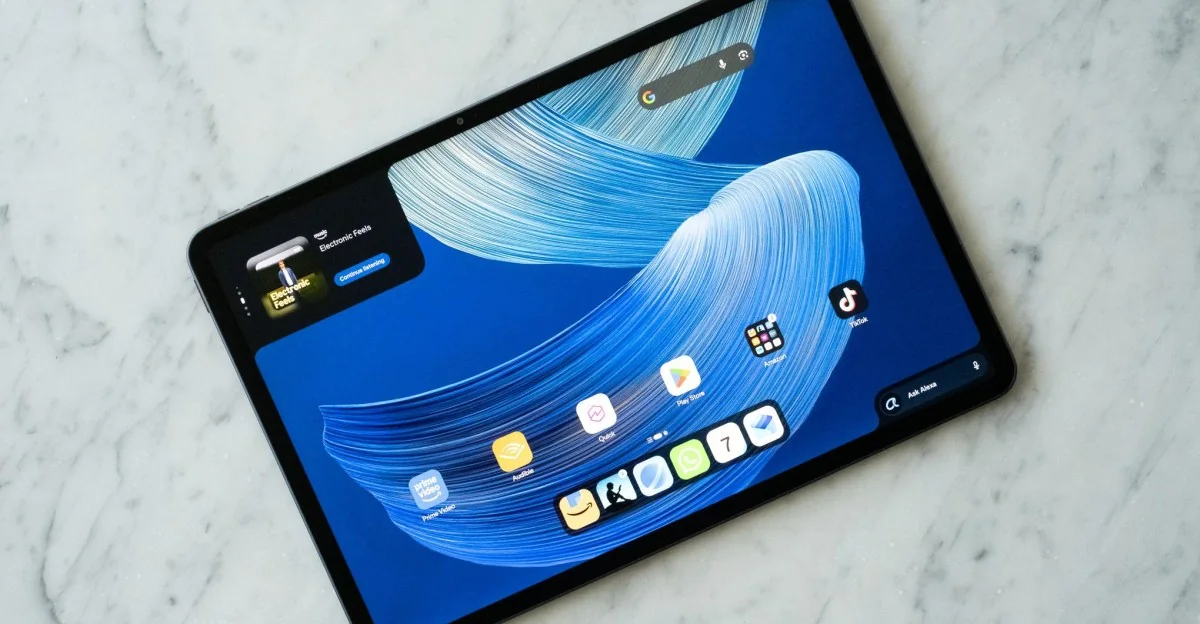
Moving away from ultra-cheap hardware built primarily for children, the $499 Alexa Tablet 12 Pro represents Amazon's attempt to engineer a high-end Android tablet designed for everyday general use.
Hands-on with Amazon’s Alexa Tablet 12 Pro and its wild new matte display
The device marks a significant departure by running a full-fledged version of Android complete with native access to the Google Play Store.
Hardware and Performance
The tablet runs on a MediaTek Dimensity 8400 8-core processor paired with 8GB or 12GB of RAM. While this configuration handles basic apps, multitasking, and light gaming smoothly, demanding titles will not run at peak performance. Its aluminum unibody construction weighs 550 grams, offering a sturdy yet light form factor.
The Nanomatte Display
The standout feature is the 12.3-inch 3:2 display configuration featuring Corning's Nanomatte technology. Priced at $549.99 for this configuration, the coating mirrors Apple's nano-texture approach to significantly minimize glare and provide a paper-like tactile experience.
The visual difference between the matte option and standard glossy alternatives is substantial during daily use.
The source review notes that the Nanomatte coating practically eradicates reflections, maintaining readability even when evaluated in brightly lit environments.
By contrast, traditional glossy screens easily wash out under harsh ambient light and act like mirrors, whereas the Nanomatte panel maintains clear viewing angles.
Reading and Battery Modes
The hardware integrates well with specialized reading profiles, such as Kindle mode, which limits background processes, lowers blue light, and offers grayscale ink options. Activating these reading profiles stretches battery longevity from 16 hours up to 20 hours.
Stylus interactions feel fluid and natural on the textured glass surface, comparing favorably to alternative high-end tablets on the market.
Accessories and Usability
Optional magnetic accessories like the Pro Pen and Pro Keyboard provide functional utility for quick tasks, though the keyboard case employs a somewhat clunky two-piece construction and cramped keys.
Alexa Everywhere
The operating system heavily integrates Amazon's AI assistant across the user interface.
An "Ask Alexa" shortcut bar sits in the corner alongside a Dynamic Tab that surfaces contextual suggestions based on personal reading, viewing, and shopping history.
Privacy controls allow users to keep more invasive processing features disabled by default, ensuring On-Screen Intelligence functions strictly on an opt-in basis.
When enabled, the assistant can parse images to find matching products or automate calendar entries, though its utility heavily depends on user preference for automated commerce features.